listing to a cw wave and hearing varying and intermittent power fluctuations.
look like this...
sounds like this...
radio pings....across approx one hour
Showing posts with label Radio Meteors. Show all posts
Sunday, April 3, 2016
Tuesday, August 19, 2014
Counting Radio Meteors
20140820 – This is a sneek peek, as I am still working on this blog entry...8)
I recently found out that current browser updates now include many experimental features. One of the current good ones is the WEB Audio API. This is a very sophisticated set tool tools to control and manipulate audio within the browser context.
Not just start and stop but many signal processing things can be done to the audio data. So, with this new knowledge. I wondered if I could re-write the processing.org version of the RADMC_Pingometer into a browser based version?
Well, as fate would have I was learning HTML5,JS,CSS,PHP,JQuery via the Codecadmey.com online learning . I highly recommend this learn by example method used by Codecademy.
So, with this little bit of knowledge, I started with raw HTML5,WEB audio api , and promptly blew a few brain cells. Then looking around at all the good examples found in google searches. I found that there was a simpler way. The gang at P5.js have made it easier to convert processing.org Pde’s into P5.js. It is really a modified and adapted processing into web based components. And as luck would have it the Web Audio api is well catered for.
After a few weeks of basic discovery on how things are written in P5.js. I was able to modify a good simple example into the meteor counting tool I had wanted. Ta…Da….
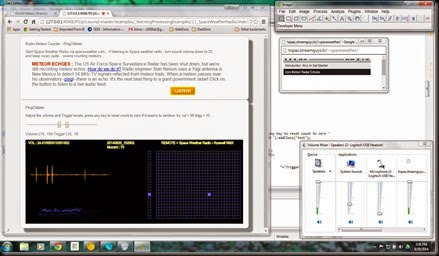
| browser based meteor counter |
It runs from a local host httpserver via a link, so you will need a local server to make it work for you. See the P5.js site for some info on that.
To start playing around with this your self, get the P5.js download and examples working for you. The under this, down load my set of files from the google drive share. A link to your save location of these files via the local http server should show the above web page.
As this is trying to do experimental things in your browser some settings need to be adjusted. In CHROME the developer mode needs to be set on. try to get a current version update or experiment with CHROME canary version.
| Some example pings captured from example Audio wav file. |
How to Setup
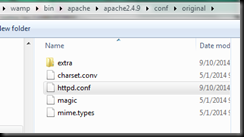
This is for the windows users, get yourself the wampserver download from the web, and let it install into the C:/wamp/ location on your drive. A c:/wamp/www directory will be made at that location. That’s where the index.html will launch from and the other web pages and supporting files are below this. A small bit of configuration may be required to make the wampserver listen on another port, find httpd.conf in this location in the wamp directory tree,Change the listen port number 80 on line 58 to say 4080, or some other number. When done restart all services via the wampserver manager tool some where on your tool bar.
When we re done we should be able to launch three tabs in google chrome , like this…
Next, get P5.js from the web and expand it into the c:/wamp/www location. Then get my files from the google share and expand them to the same location.
Goole share here, Share files, get index.html and spwrdbutton.gif
Labels:
Geminids,
meteors,
P5.js,
processing.org,
radio,
Radio Meteors
Saturday, May 24, 2014
Listening to SpaceWeather Radio
spent a few hours across 20140523-24 hoping to hear some camel droppings..... that doesn't sound right...... The #Camelopardalids #meteorshower was active on these days they are from comet 209P as earth passed through old remnants of the comets tail.
So used my RADMC_pingo software to capture a few traces. Here' the best looking pings...
![]() |
| Radio meteor signal levels |
![]() |
| meteor counts at the end of each hour. |
Friday, October 4, 2013
DIY Passive Radar Meteors
Found this very interesting use of USB TV dongles. This very smart guys had made a passive Doppler radar that can see aircraft and occasional meteors . I gotta try this at least once...need more info though.
see this link and follow to the guy doing the really cool stuff.
howto Passive Radar RTL-USB
take a good look at the video....
see this link and follow to the guy doing the really cool stuff.
howto Passive Radar RTL-USB
take a good look at the video....
Sunday, December 2, 2012
Fun with Geminids Meteors 2012
The Geminds are coming, you may be lucky to have no clouds and be in dark enough skies to visually count them. Or even capture a few images. But if the clouds come you can still hear then and now also capture images of then using these examples of DIY meteor counters.
Get Processing programing environment from this location. Install it on to your computer. Try some of the examples, it very easy to get started.
The first example is a simple test to see that you can hear and see the audio trace,. You may need to adjust your audio settings to make this work. The programs are trying to listen to the audio line on your PC. Try it without any USB headsets if they are connected. changing the audio mixer settings may help.
Get the text code here for RadMCmin.txt. Copy the text into a new sketch and save. When you have the space weather Radio stream active, run the RADMCmin program , You will see a small window open to display a spectrogram and a signal trace of the signal level. A good meteor will look this..
This one doesn't count or save anything, your challenge would be to make changes to this version to make your own meteor counter.
Yes, here's one I made earlier, this one saves a time stamped screen image of the event and also counts each event. It has a trigger control to set sensitivity, look at the code for all the control keys.
Get the text code here for RadMCpingo.txt ....
You will need to make a small directory tree under the pingo directory, like this...
So when you save a few good images then make a timeline of the events with your favorite image software, like this... I used ImageJ...
Since you now have a UTC time line of events you could then try to correlate these events to other sources of info like this one, Fireball Network in the USA. The Space weather radio signal is being detected in New Mexico. The fireball network has a few cameras there also.
Get Processing programing environment from this location. Install it on to your computer. Try some of the examples, it very easy to get started.
The first example is a simple test to see that you can hear and see the audio trace,. You may need to adjust your audio settings to make this work. The programs are trying to listen to the audio line on your PC. Try it without any USB headsets if they are connected. changing the audio mixer settings may help.
Get the text code here for RadMCmin.txt. Copy the text into a new sketch and save. When you have the space weather Radio stream active, run the RADMCmin program , You will see a small window open to display a spectrogram and a signal trace of the signal level. A good meteor will look this..
This one doesn't count or save anything, your challenge would be to make changes to this version to make your own meteor counter.
Yes, here's one I made earlier, this one saves a time stamped screen image of the event and also counts each event. It has a trigger control to set sensitivity, look at the code for all the control keys.
Get the text code here for RadMCpingo.txt ....
You will need to make a small directory tree under the pingo directory, like this...
So when you save a few good images then make a timeline of the events with your favorite image software, like this... I used ImageJ...
Since you now have a UTC time line of events you could then try to correlate these events to other sources of info like this one, Fireball Network in the USA. The Space weather radio signal is being detected in New Mexico. The fireball network has a few cameras there also.
Labels:
Comet,
Geminids,
meteors,
phaethon,
processing.org,
radio,
Radio Meteors
Subscribe to:
Posts (Atom)